Phishing vs Spam: What’s the Difference?
Spam is unsolicited bulk messaging aimed at selling or promoting, while phishing is targeted deception aimed at stealing credentials or money. The overlap is mostly cosmetic, even though both can arrive as unwanted messages.
You may see both in the same inbox during a busy morning. One message advertises a product you never asked about. Another claims your bank account needs urgent verification. The first wants your attention. The second wants your trust.
That distinction changes how you respond. Spam usually calls for filtering, deletion, or an unsubscribe action you trust. Phishing calls for caution, reporting, and sometimes immediate account recovery. We'll separate the two by motive, sender behaviour, technical signals, and potential harm.
Quick answer on phishing vs spam
The simplest way to remember the difference is this: spam is a volume problem, while phishing is a deception problem. Spam usually sends the same promotional message to many people. Phishing impersonates a trusted person or organisation to make you click, pay, download something, or reveal confidential information.
The difference between spam and phishing can be unclear because phishing often uses the same delivery system as spam. Both may land in junk folders, use urgent subject lines, and include links. A phishing message can also look like a marketing email, while legitimate marketing can use poor design and aggressive language without being a scam.
A useful rule: Spam wants your attention. Phishing wants your trust.
Canada's complaint data shows why the distinction matters. The CRTC received over 216,800 complaints at the Spam Reporting Centre between October 1, 2023 and March 31, 2024, or about 8,338 complaints per week. The leading phishing and scam categories included private company impersonation, government impersonation, employment scams, advanced fee scams, and bank impersonation, as recorded in the CRTC's 2023–24 report.
If you want a broader introduction to the filtering side, our guide to what spam filtering does for email security explains how providers sort unwanted messages before they reach your inbox.
The practical test is straightforward. Ask what the sender wants, whether the sender is genuine, and what could happen if you follow the request. Those questions work better than judging a message by its appearance alone.
What spam actually is
Spam is unsolicited messaging sent in bulk, usually to promote a product, service, website, or offer. It often comes from a mailing list or campaign system, and the sender's main goal is reach. The message may be annoying, irrelevant, or misleading without directly trying to steal your password.
A common example is an email titled “Limited time offer!” from a retailer you don't recognise. It may use a generic greeting, place many recipients in a broad mailing field, repeat sales language, and push you towards a product page. The sender may include an unsubscribe link, but you shouldn't assume every link is safe just because it says “unsubscribe”.
Spam commonly appears in a few forms:
Marketing blasts: Repeated promotions sent to a large list.
Affiliate promotions: Messages that earn the sender a commission when you visit or buy.
Sweepstakes lures: Offers claiming you've won a prize or can enter an exclusive draw.
The key signal is breadth. The sender often doesn't know much about you and doesn't need a specific response from you. They want many people to notice the offer, visit a page, or make a purchase.
Why junk and spam aren't exactly the same
People often use junk and spam interchangeably. In everyday email software, “junk” usually describes the folder or classification used for unwanted messages. Spam describes the message behaviour itself, particularly unsolicited bulk distribution.
A legitimate newsletter can become spam for you if you never subscribed, even if the business is real. A message can also avoid the junk folder while still being unwanted. Filtering systems make predictions based on sender reputation, message patterns, recipient reports, and authentication signals, so folder placement isn't proof of legitimacy.
Spam can still carry danger. A promotional-looking message may send you to a deceptive shop, a malware download, or a phishing page. That's why you should judge the requested action, not just the marketing tone.
Safe action: If you don't recognise the sender and don't need the offer, mark the message as spam and delete it. Don't reply.
What phishing actually is
Phishing is a deceptive attempt to steal credentials, money, personal information, or access to a system. The attacker impersonates a trusted source and creates a reason for you to act quickly. The message may arrive by email, text, direct message, or another communication channel.
Suppose you receive a delivery notice that appears to come from a courier. It uses your name, says a parcel is waiting, and asks you to confirm a small detail through a tracking link. The sender address contains a look-alike domain with one altered character. The page resembles the courier's login screen, but it sends your username and password to the attacker.
The message succeeds through deception, not just through volume. It may target a broad audience, a particular business team, or one individual. A polished logo doesn't make it genuine, and a spelling mistake doesn't automatically make it fake.
Common phishing forms
Bulk phishing sends similar lures to many recipients. A fake account notice or delivery alert may reach people who have no relationship with the supposed organisation.
Spear phishing targets a particular person or team. The attacker may mention a real colleague, supplier, project, or payment process. Familiar details can make the request feel routine.
Smishing is phishing delivered by SMS or another text-based mobile channel. Canadian reporting shows why this matters. In one reporting period, 83% of phishing messages reported to the CRTC were texts, and Canadian reporting has also described more spam-text reports than email-spam reports in 2022 data cited by Global News. The Global News coverage also discusses how phishing has moved beyond traditional email.
Phishing messages often ask you to log in, confirm payment information, open an attachment, transfer funds, or share a verification code. The request may look ordinary, but the consequence can include account takeover, financial fraud, malware infection, or exposure of business data.
The warning sign isn't urgency by itself. It's urgency combined with an unexpected request and a sender you haven't independently verified.
Key differences between phishing and spam
A suspicious message becomes easier to judge when you score it across several dimensions. No single signal proves that a message is safe or malicious, but the pattern gives you a better basis for action.
| Axis | Spam | Phishing |
|---|---|---|
| Motive | Promotion, advertising, or gaining attention | Credential theft, financial fraud, data theft, or malware delivery |
| Sender behaviour | Bulk distribution through marketing or campaign infrastructure | Impersonated display names, look-alike domains, unusual reply-to addresses, or a compromised account |
| Technical signals | Repeated templates, campaign links, unsubscribe patterns, and sender reputation issues | Link and domain mismatches, anomalous authentication, shortened or redirected links, and suspicious attachments |
| User risk | Wasted time, clutter, unwanted marketing, or exposure to unsafe pages | Account takeover, stolen funds, malware, identity misuse, or a wider data breach |
Spam usually tries to move you towards a product page. Phishing tries to move you towards a decision that benefits the attacker. That decision may involve entering a password, paying an invoice, opening a document, or approving a login.
Junk vs Phishing: A Specific Distinction
Junk email describes unwanted mail of any kind, including spam, newsletters you didn't sign up for, or old promotional offers. Phishing is a type of fraud that uses deception to steal credentials or money.
Every phishing email is potentially a threat, while junk email is mostly a nuisance. That's why your provider's junk folder serves as a first line of defence for volume and obvious spam, but phishing messages sometimes evade those filters because they're designed to look legitimate.
The safest approach: Treat unexpected requests from trusted organisations as potentially suspicious, even if they land in your inbox instead of junk.
Sender behaviour tells only part of the story
A display name is easy to copy. An email that appears to come from “Payroll” may use an unrelated address, and a familiar brand name may sit beside a domain that differs by one character. Check the actual address and the reply-to field rather than relying on the name shown in your inbox.
Authentication also needs careful interpretation. SPF, or Sender Policy Framework, checks whether a sending server is authorised for a domain. DKIM, or DomainKeys Identified Mail, adds a cryptographic signature. DMARC, or Domain-based Message Authentication, Reporting and Conformance, helps a domain owner specify how receiving systems should handle messages that fail alignment checks.
These standards are valuable, but they don't prove that the sender's business request is legitimate. A real domain can be compromised, and an attacker can send a message from infrastructure that passes authentication.
For a deeper look at the evidence inside an email, use our guide on reading email headers and spotting a fake sender. The safe approach is to combine technical evidence with context. Were you expecting the message? Does the request fit the sender's normal process? Can you verify it through a separate channel?
Where the two threats overlap in real inboxes
Real inboxes don't separate threats as neatly as a textbook. A phishing campaign may use bulk delivery methods, while an ordinary promotional email may contain a risky link. Some messages combine commercial language with a request for payment or account details, making motive harder to identify at a glance.
Canadian complaint data shows the scale of both unwanted messaging and impersonation-based fraud. In the 2024–25 reporting cycle, the CRTC received over 208,083 complaints, or about 8,003 per week, and the leading phishing and scam categories included government impersonation, extortion scams, private company impersonation, employment scams, and bank impersonation. The CRTC's 2024–25 update also records that only about 2.2% of complaints came through the online form.
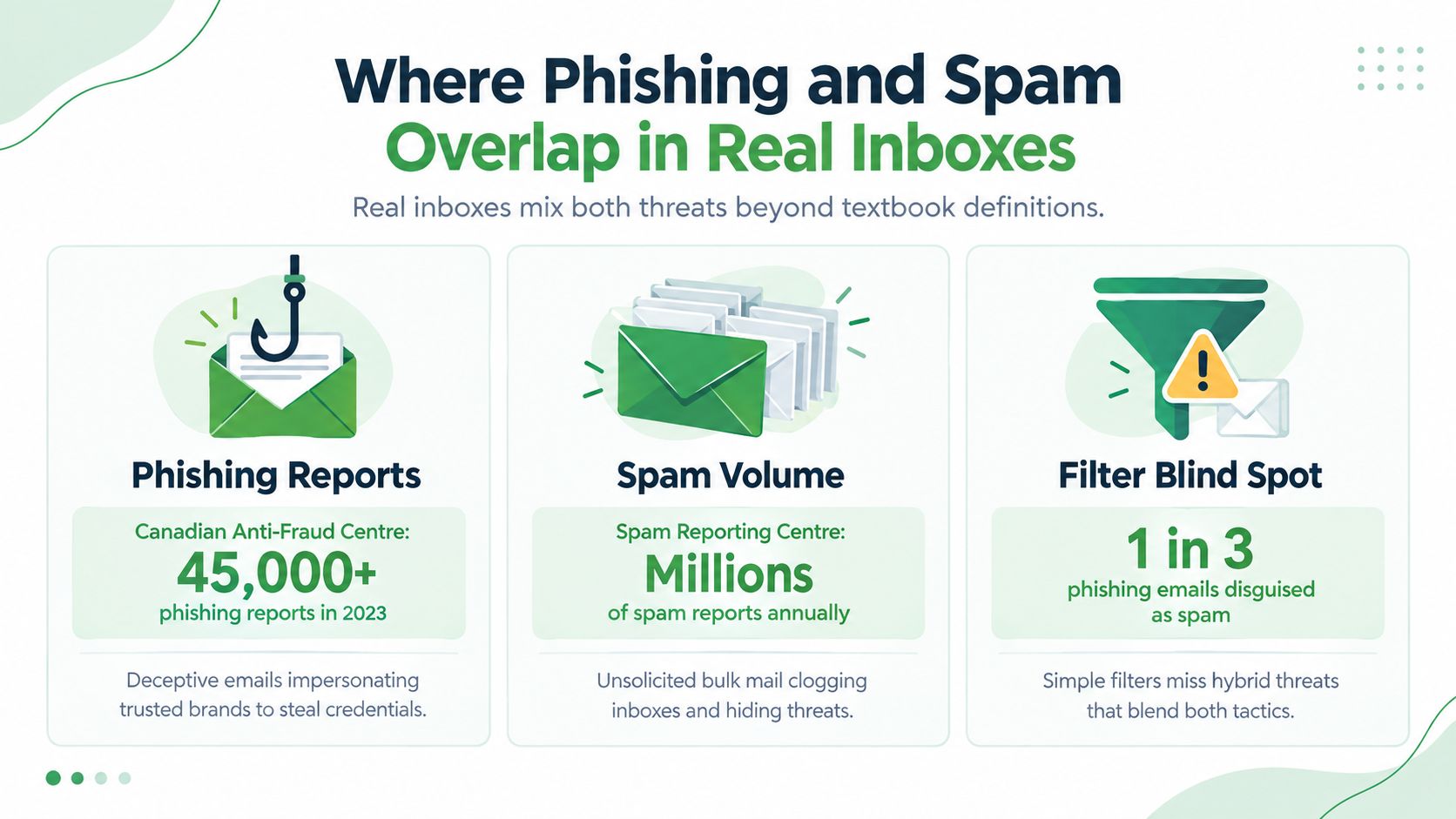
The complaint categories point to an important difference. Spam filtering can identify repeated campaigns, unusual volume, and common marketing patterns. Phishing detection needs to inspect trust signals, including display-name anomalies, look-alike domains, reply-to mismatches, and the intent behind a request.
A clean authentication result isn't a guarantee of good intent. A compromised account can send authenticated mail, and a phishing operator can use legitimate sending infrastructure. Likewise, a real business can send poorly targeted or overly aggressive marketing that resembles spam without trying to steal information.
Practical rule: Treat authentication as evidence, not a verdict. Verify unexpected requests through a trusted route.
This is why the best email protection uses layers. Volume signals help reduce clutter. Behavioural and impersonation signals help identify messages that look ordinary but ask you to take an unsafe action.
How to detect and handle each one safely
Start with the message, not the story it tells. If an email asks you to log in, pay, download, or share information, pause before following its instructions.
A personal inbox playbook
First, hover over links without clicking. Look for misspellings, unexpected domains, shortened addresses, and destinations that don't match the organisation named in the message. On a phone, press and hold carefully or use a separate browser search instead of opening the link.
Next, inspect the sender address character by character. A display name can be copied, but the full address gives you more information. If the email claims to be from your bank, open the bank's app or type its known web address yourself. Don't use the contact details supplied in the suspicious message.
Use the following habits:
Pause on urgent requests: Treat unexpected payment, login, account-lock, and verification prompts as high-risk.
Protect credentials: Never enter a password or one-time code through a link you didn't independently verify.
Report before deleting: Send suspected phishing through your provider's reporting function and use the appropriate Canadian reporting channel.
Handle ordinary spam discreetly: Mark unwanted promotional mail as spam and delete it. Don't reply, and don't follow an unfamiliar unsubscribe link.
The Canadian Anti-Fraud Centre provides federal consumer guidance and reporting information for fraud. The CRTC's Spam Reporting Centre remains the relevant route for suspected spam and violations related to Canada's anti-spam framework. Use the official government pages rather than contact details inside a questionable message.
If you clicked or submitted information
Don't assume that closing the browser solves the problem. If you downloaded a file or suspect malware, disconnect the device from networks and run a trusted security scan. From a clean device, change the affected password and any other password you reused.
Enable multi-factor authentication where it's available. Contact your bank or card provider if financial details were entered, and monitor accounts for activity you don't recognise. Tell your workplace security contact quickly if a business account, device, or document was involved.
For small businesses, turn these habits into a short staff process:
Report quickly: Give employees one visible reporting route.
Use technical controls: Configure DMARC enforcement with SPF and DKIM alignment, and isolate suspicious links or attachments where possible.
Keep the response blameless: Employees report faster when they know a mistake will lead to help, not punishment.
Verify payments separately: Confirm changes to banking details or urgent transfers by phone using a known number.
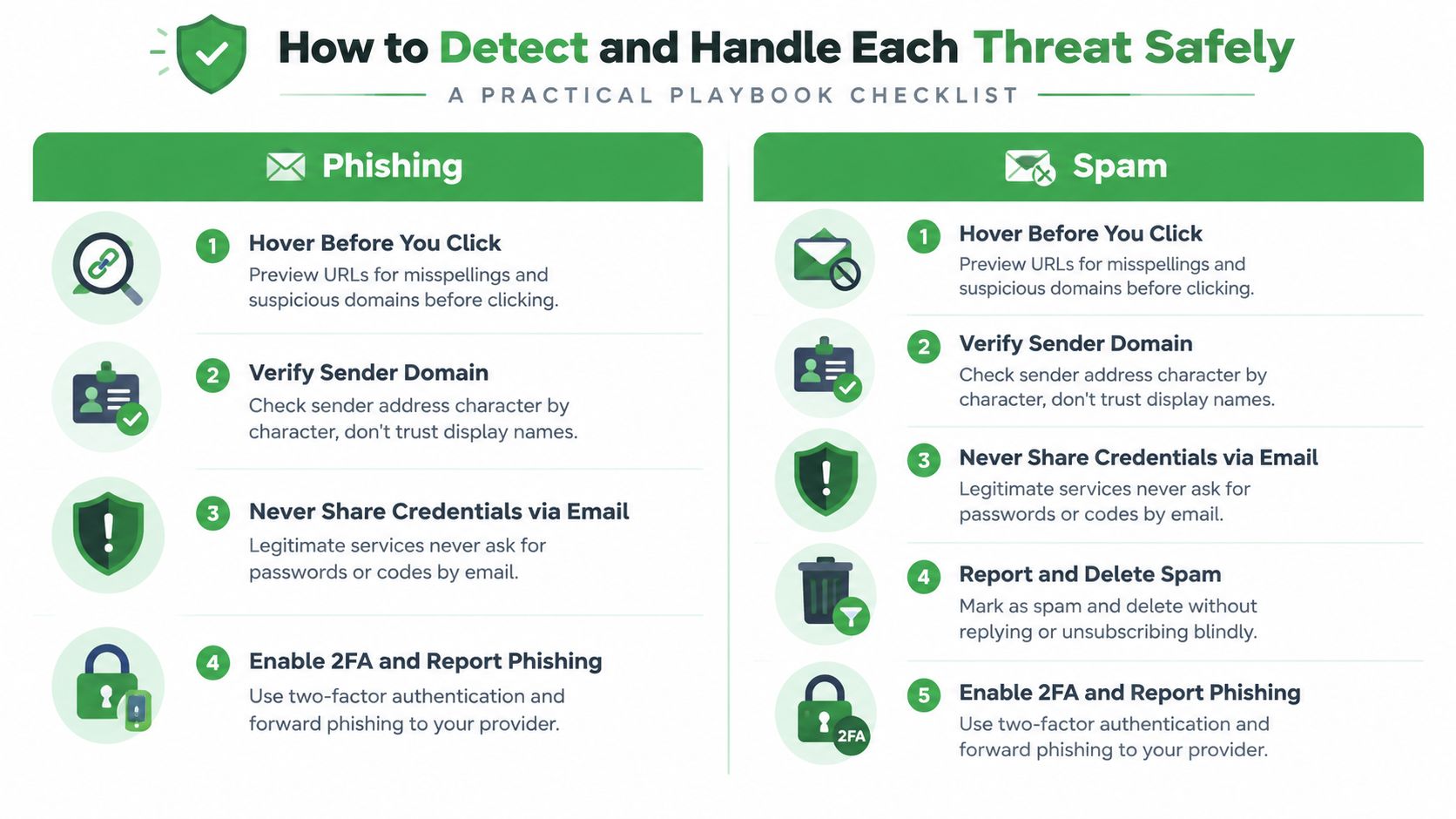
A secure email routine should make the safe action easy. Report the message, stop interacting with it, and involve the right person when credentials, money, or company data may be exposed.
How a privacy-first email provider reduces both risks
Spam and phishing need different controls, so a provider shouldn't treat them as one problem. Spam defence should reduce unwanted bulk mail through sender reputation, campaign similarity, recipient feedback, and volume patterns. The result is a cleaner inbox, with less noise hiding a message that deserves closer attention.
Privacy changes the incentive structure as well. An ad-supported provider may scan message content for advertising or build behavioural profiles around how you use email. A privacy-focused service should explain what it processes, avoid ad profiling, and limit data collection to what the service needs to operate.
Phishing protection needs a separate layer. Useful controls include display-name spoofing detection, domain alignment checks, attachment and link analysis, and warnings for suspicious destinations. The provider should also offer a clear reporting action so threat samples can improve detection without making the user investigate technical details.
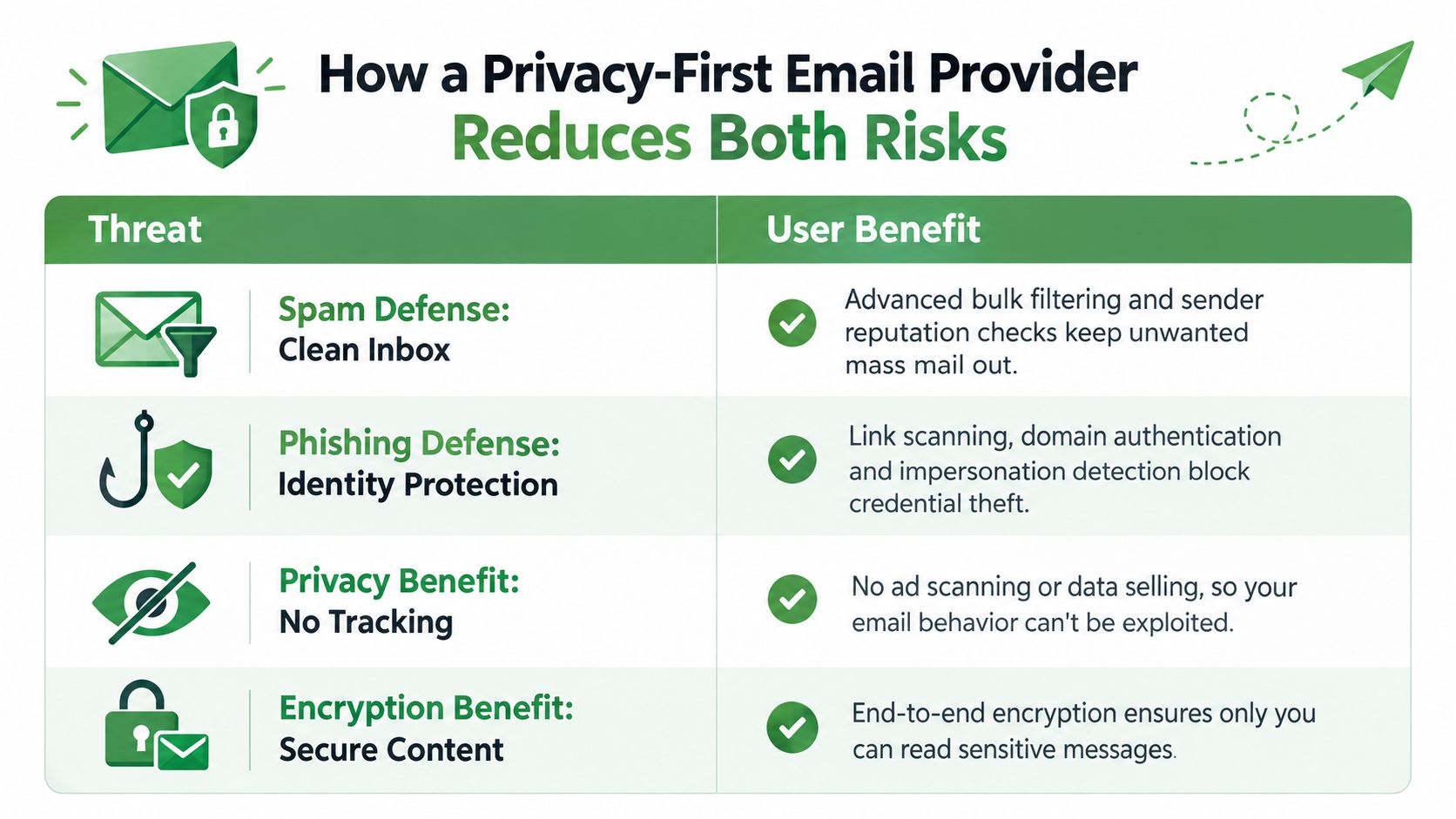
Encryption protects a different part of the problem. SMTP, the Simple Mail Transfer Protocol, moves messages between servers. IMAP, the Internet Message Access Protocol, synchronises messages with your devices. PGP, or Pretty Good Privacy, can protect message contents in compatible exchanges, but it requires key management and doesn't automatically secure every email you send.
A provider may also offer zero-access encryption, encrypted storage, virus filtering, aliases, and custom filters. Those features can reduce exposure, but they don't remove the need for judgement. A trusted provider can still receive a carefully crafted phishing message, and no filter can understand every unusual business request perfectly.
Typewire is one option for readers who want a Canadian private email service. We operate infrastructure in Vancouver, host email in Canada, and offer ad-free encrypted email with spam filtering and phishing detection. Our business model relies on subscriptions rather than advertising or data sales, but you should still review any provider's technical documentation, privacy terms, and encryption limits before choosing it. You can read more in our overview of Typewire as a private email alternative.
Key takeaways and common follow-up questions
Keep these five points in mind:
Spam is volume: It usually promotes something to a broad audience.
Phishing is deception: It tries to make you trust a false identity.
Signals differ: Spam relies more on campaign and volume patterns, while phishing needs impersonation, domain, link, and intent checks.
Reporting paths differ: Use your provider and the relevant Canadian reporting services.
Privacy still matters: An inbox shouldn't turn your messages and behaviour into advertising data.
Frequently Asked Questions
How do I report a suspicious message? Use your email provider's report function, then consult the official Canadian Anti-Fraud Centre guidance for fraud and the CRTC Spam Reporting Centre for suspected spam activity. Don't use a phone number or link supplied by the suspicious message.
Does SMS phishing follow the same rules? The goal is the same, but the channel changes the clues. Smishing may use a phone number, short code, delivery notice, or message thread instead of an email address. Don't open the link. Verify through the organisation's official app or website.
What should I do after entering credentials? Change the password from a clean device, change reused passwords, enable multi-factor authentication, and contact the affected service. If financial information was involved, contact your bank and monitor the account.
How long does a compromised account remain at risk? There's no fixed timeline. Treat it as at risk until you reset credentials, revoke unfamiliar sessions, secure recovery methods, and confirm that no forwarding rules or new devices remain connected.
Return to the checklist above and apply it to the next unexpected message before you click.
We provide ad-free, encrypted email with spam filtering, phishing detection, Canadian hosting, custom domains, and no data mining. Visit Typewire to start the free trial and keep your inbox focused on communication rather than tracking and unwanted threats.
The post Phishing vs Spam: What’s the Difference? appeared first on Typewire.
Phishing vs Spam: What’s the Difference?
Posted: 2026-09-15
What Is a Data Breach? How Exposed Email Credentials Put You at Risk
Posted: 2026-10-27
What Is Social Engineering? How Hackers Target Your Email
Posted: 2026-10-23
Cyber Attack Canada: Email Threats Targeting Businesses
Posted: 2026-10-20
What Is Spear Phishing and Why Targeted Attacks Hit Harder
Posted: 2026-10-16
What Is Smishing and How to Avoid SMS Phishing
Posted: 2026-10-13
How to Whitelist an Email Address (So You Stop Missing Messages)
Posted: 2026-10-06
Email Bounce Explained: Soft vs Hard Bounces & How to Fix Them
Posted: 2026-10-02
Which Secure Email Provider Fits Your Workflow? 10 Options by Use Case
Posted: 2026-09-29